
How to Easily Find Out Who Hosts a Website and Its IP Address. Have you ever wondered who is hosting a website or what IP address a domain is using? Whether you are troubleshooting connectivity issues, researching competitors, reporting abuse, or simply satisfying your curiosity, identifying a website's hosting provider and IP address is surprisingly easy.
In this guide, I will walk you through using a free Windows utility called IPNetInfo by NirSoft, along with a few modern alternatives and important caveats to be aware of.
IPNetInfo is a lightweight, portable tool that retrieves detailed information about an IP address or domain name, including ownership, hosting provider, network range, and abuse contact information.
Important note: Hosting information is only truly accurate when the hosting company owns the IP block. If a site is behind a CDN or reverse proxy such as Cloudflare, Akamai, or Fastly, you will see the CDN provider instead of the actual web host.
How to Find Out Who Hosts a Website and Its IP Address
- Download IPNetInfo from the official NirSoft website.
After downloading, unzip the archive and double click ipnetinfo.exe.
No installation is required. - In the IPNetInfo window, enter the domain name you want to check, such as example.com.
Ensure the option Convert Host Names to IP Addresses is enabled, then click OK.
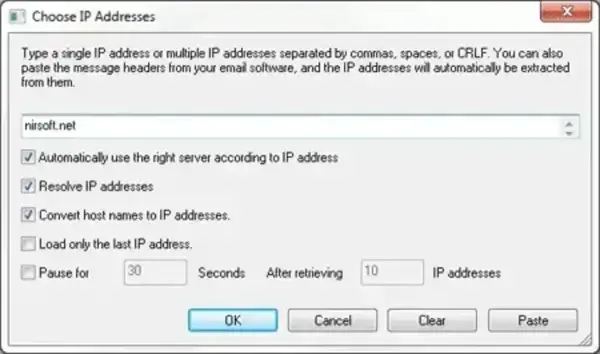
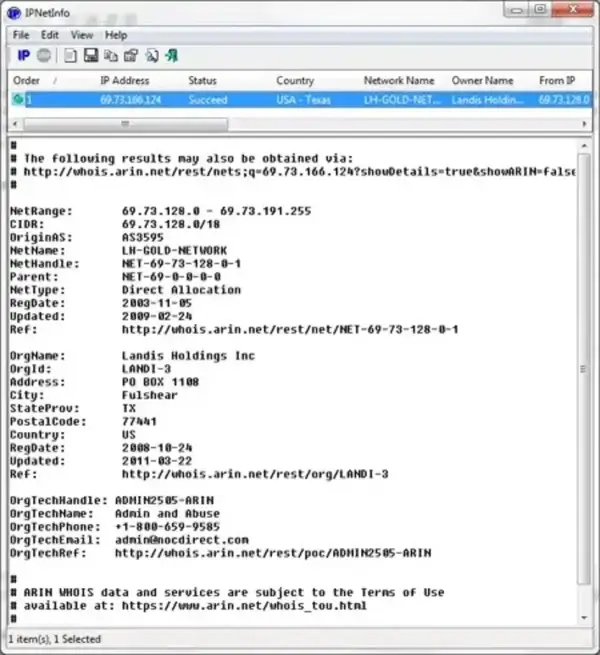
- IPNetInfo will retrieve and display detailed results including:
- Resolved IP address
- Hosting provider or network owner
- Organization name
- Country and region
- Abuse and technical contact details
Why Would You Want to Know Who Hosts a Website?
- Website troubleshooting to identify hosting related outages
- Competitive research to understand infrastructure choices
- Security investigations and abuse reporting
- DNS or migration planning before moving a site
- Verifying CDN usage versus direct hosting
Important Limitations to Understand
Modern websites often use:
- Content Delivery Networks (CDNs)
- Reverse proxies
- Cloud platforms such as AWS, Google Cloud, or Azure
In these cases, the IP address you see belongs to the proxy or CDN, not the actual origin server. This is expected behavior and not a flaw in the tool.
Alternative Ways to Find Website Hosting Information
If you prefer browser based or cross platform tools, here are several reliable alternatives:
Command Line Options
Advanced users may prefer command line tools:
nslookup example.com
ping example.com
tracert example.com
These commands can quickly reveal IP addresses and routing paths, although they provide less ownership detail than IPNetInfo.
Summary
Finding out who hosts a website and identifying its IP address does not require expensive tools or technical expertise. IPNetInfo remains one of the most accurate and lightweight utilities available for Windows users, especially when dealing with direct hosting providers.
Just remember that modern web infrastructure often masks the true origin server behind CDNs and cloud platforms. When interpreted correctly, these tools provide invaluable insight for troubleshooting, research, and security analysis.
Looking for more website tools, server tips, or WordPress tutorials? Feel free to explore the rest of the guides right here on the site.