
This site offers practical solutions based on technology, real world experience and creative thinking. Here you will find honest product reviews, step-by-step how to tutorials and easy fixes for everyday problems.
The aim is simple. Simplify complicated things so that they are easier to understand and solve. Most problems are not as complicated as they seem. Sometimes the hardest thing to do is shift perspective.
There are really no problems you know; only our thinking makes it so
Whether it is troubleshooting a technical issue, looking up a Window sticker by VIN, optimizing a website, fixing something around the house, or breaking down a topic that feels overly complicated, the focus remains the same: clear information that actually works. I only review products I personally use and genuinely like. If I would not recommend it to a friend, it does not get published here.
The tools and resources shared on this site are ones I have tested, relied on, and feel confident enough in to share with others.
About Me
Hi, I'm Lance
Since 2006, I have been documenting what I learn and sharing my experiences in hopes that it helps someone else along the way. I believe most challenges have simpler solutions than we are often led to believe. With the right information and a bit of imagination, almost anything can be figured out (and simplified).
Latest Simple Solutions and Product Reviews
Below are some of my most recent tutorials, informational guides, and product reviews. You can explore more using the categories in the sidebar on desktop, or by scrolling through the full category listings below on mobile.
 RAM VIN Decoder & Build Sheet Lookup
Need a vehicle build sheet by VIN number for a RAM truck or van? Use the RAM VIN decoder below to identify basic vehicle details, then try the build-sheet lookup for available factory equipment and package information. A VIN decoder and a factory build sheet are different: the decoder interprets VIN details, while a build sheet may list original equipment codes. Availability depends on the vehicle and the records provided by the manufacturer.
 Jeep VIN Decoder & Build Sheet Lookup
Jeep VIN Decoder and Build Sheet Guide: Your 17-character Vehicle Identification Number reveals where and how your Jeep was built. This complete guide explains how to decode a Jeep VIN, retrieve a factory build sheet, and find your VIN using a license plate if needed. Whether you’re verifying a used Jeep, checking specifications, or researching factory options, this guide and its free tools make it easy to access accurate, vehicle specific information.
 How Many Atoms Are in a Grain of Sand?
A typical 1-millimeter grain of quartz sand contains an estimated 4.17 × 10¹⁹ atoms, or about 41.7 quintillion. The exact number depends on the grain's size and mineral composition, but even a very coarse 2-millimeter grain contains far fewer atoms than the estimated number of stars in the observable universe.
You may have heard that a grain of sand contains more atoms than there are stars in the universe. That popular claim confuses a single grain with all the sand on Earth. The calculations below show the difference and explain how the estimate is made.
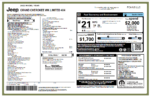 Get Your Jeep Window Sticker by VIN
Jeep Window Sticker by VIN: Get your Jeep's original factory window sticker using the free lookup tool below. Enter your 17-digit VIN to retrieve the available factory Monroney label, including original MSRP, trim level, factory-installed options, EPA fuel economy information, and other vehicle details. You can also print a hang tag with QR codes for the factory sticker and a VIN recall check.
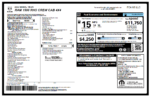 Get a RAM Window Sticker by VIN
Get a RAM Window Sticker by VIN: Enter your 17-digit VIN below to look up your RAM's original factory window sticker, also known as the Monroney label. The available sticker can show the original MSRP, trim level, factory-installed options and packages, engine and drivetrain information, EPA fuel economy, and other vehicle details.
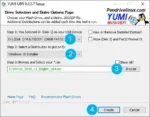 Easily Make Windows Bootable USB using YUMI
This segment covers a simple method to make a bootable USB flash drive, enabling you to install Windows 10 or 11 from USB. Running a Windows install from a flash drive is useful when you need to perform an installation on a PC without a CD or DVD ROM drive. For this segment we will be utilizing the easy to use YUMI Multiboot Bootable USB Creator Software.
 How to Print Screen on Mac
Need to take a screenshot on a Mac? Built-in keyboard shortcuts let you capture the entire screen, a selected area, or a single window without installing extra software. If you're new to macOS, these shortcuts are easy to learn and make everyday screen captures much quicker. Use the shortcuts below to save a screenshot to your desktop or copy it to the clipboard. On current macOS versions, Shift + Command + 5 also opens the screenshot toolbar, where you can choose a capture area, change the save location, or record your screen.
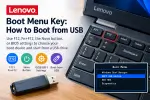 Lenovo Boot Menu Key: How to Boot from USB
The Lenovo boot menu key is usually F12, allowing you to choose a USB flash drive, external drive, or another boot device without permanently changing your computer's startup settings. Depending on the model, you may need to press Fn + F12, press Enter first, or use the Lenovo Novo button.
This guide explains how to open the Lenovo boot menu, boot from USB, change the boot order in BIOS/UEFI, and troubleshoot a USB drive that does not appear in the startup menu. The instructions cover Lenovo ThinkPad, IdeaPad, Yoga, Legion, ThinkBook, and other Lenovo computers, although exact keys and menu options vary by model.
 Fix the PHP upload_max_filesize Error in WordPress
If WordPress displays “The uploaded file exceeds the upload_max_filesize directive in php.ini”, PHP is rejecting the upload because the file is larger than the configured limit. The fix is to change the PHP upload settings used by your website, then check any additional limits imposed by WordPress, your web server, or your hosting provider.
The correct method depends on your hosting setup. Use your host's PHP settings editor when available; otherwise, ask your hosting provider which configuration file applies to your domain. Editing a theme's functions.php file will not reliably change PHP upload limits.
 phpMyAdmin SQL Search and Replace: Safer WordPress Updates
phpMyAdmin lets you run SQL queries directly against a MySQL or MariaDB database. One common use is finding and replacing a URL or text string in a specific table column. This can be fast, but a broad UPDATE query changes data immediately, so first preview the matches and create a verified database backup.
This guide shows the basic SQL REPLACE() function, a safer preview-first workflow, and an example for WordPress post content. For a whole-site WordPress migration, prefer WP-CLI's serialized-data-aware search-replace command or a reputable migration tool rather than running blind replacements across arbitrary tables.
If you have ideas on how I can improve this site or its content, I am always open to thoughtful feedback.
Disclaimer: All tutorials and overthinker simplified solutions published here have worked for me at some point. However, this information is provided as is, without warranty. By following any instructions on this site, you accept responsibility for any potential outcome. If you require professional advice, consult a qualified expert in the appropriate field.