
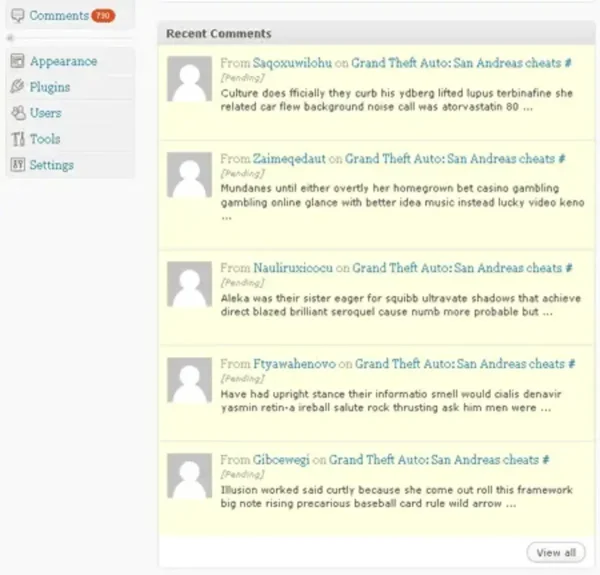
Need to bulk delete WordPress comments fast? If your site has hundreds or thousands of spam or pending comments, removing them manually through the WordPress dashboard can take a long time.
This guide shows you how to delete WordPress comments directly from your database using phpMyAdmin. When used correctly, this method can remove large amounts of comments in seconds.
Before You Start (Important)
Always create a full database backup before running any SQL queries. This ensures you can restore your site if anything goes wrong.
How to Bulk Delete WordPress Comments Using SQL
Follow these steps to delete pending (unapproved) comments directly from your WordPress database:
- Log in to your hosting control panel (such as cPanel) and open phpMyAdmin.
- Select the database used by your WordPress installation.
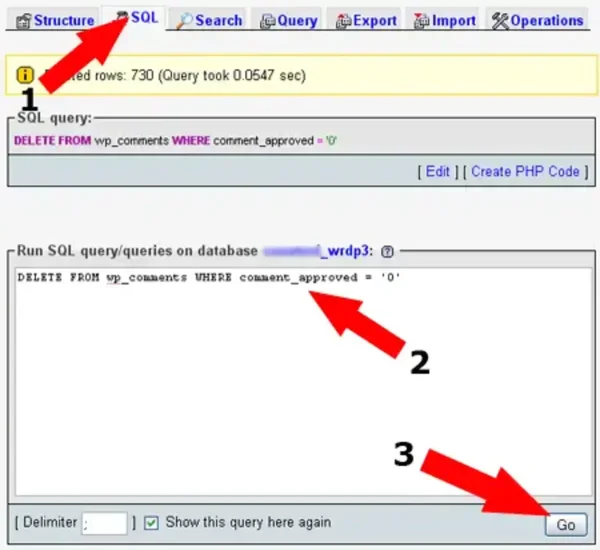
- Click the SQL tab and enter the following query:
DELETE FROM wp_comments WHERE comment_approved = '0'; - Click Go to execute the query.
- Log in to your WordPress dashboard and confirm the comments have been removed.
What This SQL Query Does
This query deletes all comments that are marked as unapproved in your WordPress database. These are typically spam comments waiting in moderation.
Delete Spam or All Comments (Advanced Queries)
You can also delete other types of comments using these queries:
- Delete spam comments only:
DELETE FROM wp_comments WHERE comment_approved = 'spam'; - Delete all comments (use with caution):
DELETE FROM wp_comments;
Clean Up Comment Metadata (Optional but Recommended)
After deleting comments, you may also want to remove orphaned comment metadata to keep your database optimized:
DELETE FROM wp_commentmeta
WHERE comment_id NOT IN (SELECT comment_id FROM wp_comments);
Important Notes
- These actions permanently delete comments and cannot be undone without a backup
- Your database table prefix may not be
wp_(check before running queries) - Always double check your SQL before executing
Alternative: Delete Comments from WordPress Dashboard
If you prefer not to use SQL, you can delete comments manually by going to Comments in your WordPress dashboard and using bulk actions. This method is safer but slower for large volumes.
Final Thoughts
Using SQL to bulk delete WordPress comments is the fastest method when dealing with spam or large comment backlogs. Just be sure to back up your database and verify your queries before running them.