
Get a free Ford Window Sticker by VIN using the lookup tool below. Enter your 17-digit VIN to retrieve the available original factory window sticker, also known as the Monroney label. It can show the original MSRP, factory installed options and packages, fuel economy information, engine specifications, and other vehicle features as recorded when the vehicle was built. You can also print a hang tag with QR codes for the factory sticker and a VIN recall check.
Whether you are buying, selling, verifying factory installed equipment, or researching a used Ford, the original window sticker provides a useful record of the vehicle's factory configuration and original pricing information.
Ford Window Sticker by VIN Lookup Tool
This free Ford VIN window sticker lookup retrieves the available factory window sticker PDF associated with the vehicle's VIN. No registration, account creation, or subscription is required.
What Is a Ford Window Sticker?
A Ford window sticker, also known as a Monroney label, is the original vehicle label that documents the vehicle's configuration and pricing information. It can be used to verify the trim level, factory installed options and packages, EPA fuel economy information, and other equipment included when the vehicle was originally sold.
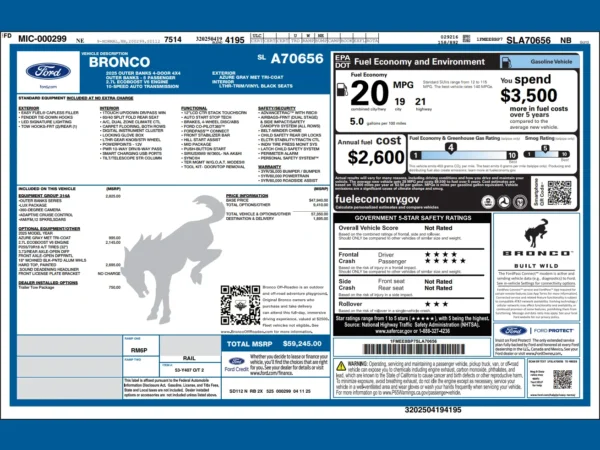
A Ford window sticker by VIN can include:
- Original MSRP
- Factory installed options and packages
- Engine and transmission specifications
- Drivetrain information
- EPA fuel economy information
- Standard equipment
- Safety and technology features
- Total vehicle price shown on the original label
The exact information displayed can vary by model and model year.
How to Get a Ford Window Sticker by VIN
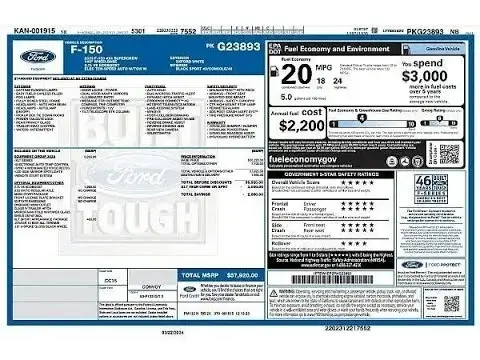
You can use the Ford window sticker lookup tool above to find the original factory sticker associated with a Ford VIN.
- Locate your 17-character Ford VIN.
- Enter the VIN into the lookup tool above.
- Click Get My Ford Window Sticker.
- Open, download, or print the available factory PDF.
- Optional: click Print Sheet with QR Code to make a printable hang tag for your Ford (details below).
When a sticker is available, the lookup normally returns the PDF within a few seconds.
Print a Ford Window Sticker Sheet with QR Code
After you enter your VIN, click Print Sheet with QR Code to build a half page hang tag for your Ford. The tag shows the VIN, the year, model and trim, and basic specs decoded from the VIN, such as body style, engine, drive type, and transmission when that information is available. It also includes QR codes that anyone can scan with a phone:
- Original factory window sticker. Opens the Ford window sticker PDF for that VIN, when a sticker is available.
- Recall check. Opens the NHTSA recall lookup for that VIN, which shows open recalls as reported to NHTSA.
- CARFAX value (optional). Tick the checkbox to add a link to CARFAX's value page. Whoever scans it will need to enter the VIN and a ZIP code there.
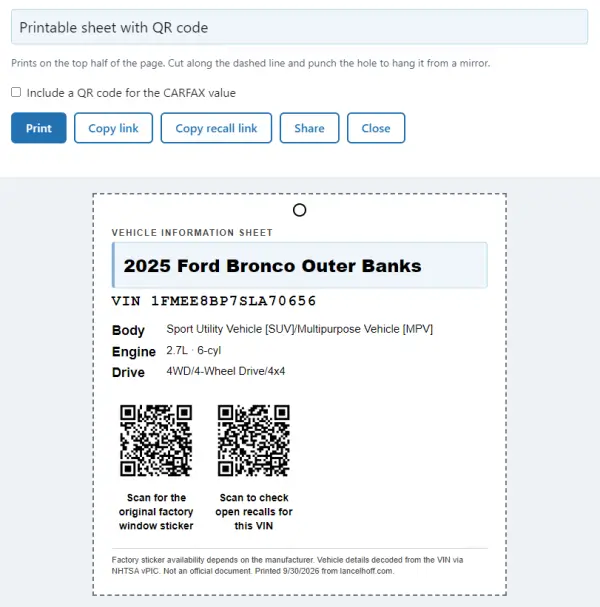
Print the page, cut along the dashed line, punch the hole at the top, and hang the tag from the rear view mirror. It's handy if you're selling an F-150, Bronco, Mustang, or Explorer privately, because a buyer can scan the code and check the original trim and factory options on their own phone.
A few things worth knowing:
- It's not an official Monroney label. It's an information sheet that links to the official manufacturer's sticker.
- The QR codes stay useful. They point to a link on this site that forwards to the current manufacturer address, so if Ford changes its system, the link can be updated without reprinting. That can't guarantee Ford keeps a sticker online for your VIN.
- The tag is built in your browser. The only outside lookup is the free NHTSA VIN decoder used to fill in the year, model, and specs. If that lookup is unavailable, the tag still prints with the VIN and QR codes.
- Specs come from public VIN data. Details such as trim can be incomplete for some vehicles, so treat the original factory sticker as the authoritative source for options and packages.
Where to Find Your Ford VIN
You can usually find your Ford VIN in several places:
- On the dashboard near the windshield
- Inside the driver's door jamb
- On your vehicle registration documents
- On your insurance card
- In dealership or vehicle inventory listings
Ford VINs contain exactly 17 characters and do not use the letters I, O, or Q. When entering your VIN, check each character carefully because a single incorrect character can cause the lookup to fail.
What Can I Use a Ford Window Sticker For?
The original Ford window sticker can be useful when buying, selling, researching, or documenting a vehicle.
- Verify the original trim level and factory configuration
- Check options and packages installed from the factory
- Confirm original MSRP and the pricing
- Compare equipment between similar Ford vehicles
- Document the vehicle's original configuration for your records
- Distinguish originally installed equipment from modifications
- Make a hang tag when selling your Ford, with QR codes buyers can scan for the original factory sticker and a recall check
This can be particularly useful when shopping for a used Ford. Two vehicles with the same model and trim name can have different factory options and packages. The original window sticker provides a record of the equipment and pricing associated with that specific VIN.
The original sticker reflects the vehicle's factory configuration. Dealer-installed accessories, later modifications, and equipment removed after production may not appear on the original window sticker.
Supported Ford Models
Many Ford and Lincoln vehicles from approximately 2007 onward are supported when factory records remain available. Common models include:
- Ford F-150, F-250, and F-350
- Ford Bronco and Bronco Sport
- Ford Mustang and Mustang Mach-E
- Ford Maverick
- Ford Ranger
- Ford Explorer
- Ford Expedition
- Ford Escape
- Ford Transit
- Lincoln vehicles
Availability can vary by vehicle, model year, and whether the corresponding factory record is still available.
Troubleshooting Ford Window Sticker Lookup Problems
The Ford Window Sticker Will Not Load
Start by checking the VIN carefully. Ford VINs contain 17 characters and do not use I, O, or Q. A single incorrect character can prevent the correct sticker from being found.
Other possible causes include:
- The vehicle was built very recently.
- The window sticker has not yet become available.
- The vehicle falls outside the available records.
- The manufacturer's sticker service is temporarily unavailable.
If the lookup tool does not return a PDF, you can also try retrieving the sticker directly by replacing YOURVIN in the URL below with the complete VIN:
https://www.windowsticker.forddirect.com/windowsticker.pdf?vin=YOURVIN
If the sticker is still available through Ford's current system, the PDF should open in your browser.
The Window Sticker Has Not Yet Been Released
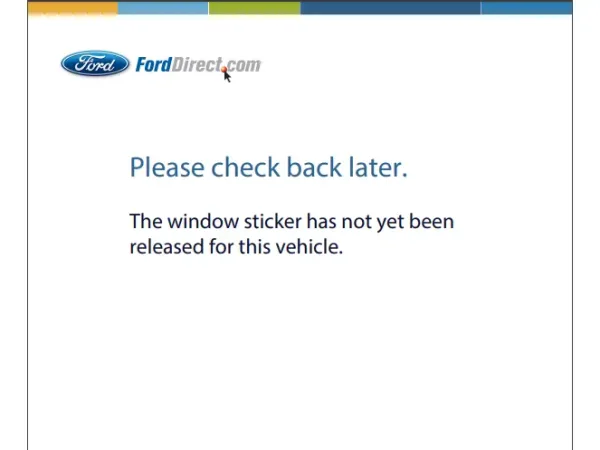
This message can appear when a vehicle has been built recently but the window sticker is not yet available through the lookup system.
If the VIN is correct and the vehicle was recently manufactured, try the lookup again later. Availability can depend on when the vehicle's factory information is added to the underlying system.
The VIN Is Correct but No Sticker Is Available
A valid VIN does not guarantee that a digital window sticker can still be retrieved. Older vehicles, certain records, or vehicles outside the available database may not return a factory sticker.
If the lookup fails, see What to Do When a VIN Lookup Fails for additional troubleshooting information.
The Printed Tag Has No Specs
The year, model, and specs on the hang tag come from the free NHTSA VIN decoder. If that service is slow or has no data for your VIN, the tag still prints with the VIN and QR codes. Check that the VIN is entered correctly, then try again. If the sticker QR opens a "not yet released" message, that comes from Ford's system rather than the tag.
Ford Window Sticker vs. Build Sheet
A Ford window sticker and a build sheet provide different types of vehicle information.
The window sticker is the customer-facing label that documents the vehicle's original configuration, equipment, and pricing information.
A build sheet provides deeper production information and may contain internal option codes and manufacturing details that are not shown on the customer-facing window sticker.
For most buyers and sellers, the original window sticker provides the information needed to verify a vehicle's factory configuration. If you need deeper production information, see the Ford VIN Decoder and Build Sheet Guide.
Ford Window Sticker FAQ
Can I get a Ford window sticker by VIN?
Yes. Enter your Ford's 17-digit VIN into the free lookup tool at the top of this page. If a Ford window sticker is available for the vehicle, the tool can retrieve the available sticker as a PDF.
What information does a Ford window sticker show?
A Ford window sticker can show the original MSRP, trim level, factory installed options and packages, equipment, fuel economy information, and other vehicle details. The exact information varies by model and model year.
Why is my Ford VIN not returning a window sticker?
A correct VIN does not always mean a digital window sticker is available. The vehicle may be too new, the record may not be available in the current database, or the manufacturer's sticker service may temporarily be unavailable. Double check the VIN you entered and if it still doesn't work, try again later.
Can I get a Ford window sticker for an older vehicle?
Many Ford and Lincoln vehicles from approximately 2007 onward are supported when records remain available. Older vehicles may not have a retrievable digital window sticker.
Can I print a Ford window sticker with a QR code?
Yes. After entering your VIN, click Print Sheet with QR Code to make a half-page hang tag. It includes a QR code that opens the factory window sticker for that VIN, a QR code for the NHTSA recall check, and an optional QR code for the CARFAX value page. The tag links to the factory sticker rather than reproducing it.
Is the printed sheet an official Ford window sticker?
No. The hang tag is an information sheet, not an official Monroney label. The original factory window sticker is the PDF the QR code opens, when one is available for your VIN.
What does the recall QR code do?
It opens the NHTSA recall lookup for the VIN on the tag. The lookup shows open recalls as reported to NHTSA. It may not include every very recent campaign, so check with a Ford dealer if you have questions about a specific vehicle.
Will the QR code stop working if Ford changes its website?
The codes point to a link on this site that forwards to the current manufacturer address, so the link can be updated without reprinting the tag. Whether a sticker is available for your VIN still depends on Ford.
What is the difference between a Ford window sticker and a build sheet?
A window sticker is the customer-facing document showing the vehicle's original configuration and pricing. A build sheet provides deeper production information and may contain internal codes and manufacturing details not shown on the sticker.
Note: Like all tools that fetch Ford original manufacturer data, this tool works by hitting Ford's underlying server database. This means it can only retrieve the sticker if Ford still hosts it. If you are looking up a very old or discontinued used model and Ford has purged it from their active database, the tool won't be able to generate it, and you might instead need to look into a paid replica service.