
The following Duplicate Sidebar Widget Plugin for WordPress allows a WordPress user to duplicate or copy sidebar widgets and use them on multiple sidebars or use the widgets more than once in the same sidebar. Duplicate Sidebar Widgets is based solely on the original Jaw Duplicate Widgets plugin. I have simply cleaned up a couple of errors, corrected the paths and made it compatible with WordPress 2.3 and beyond.
Duplicate Sidebar Widgets for WordPress
The Duplicate Sidebar Widgets functionality allows WordPress users to duplicate or copy widgets and use them in multiple sidebars, or even more than once in the same sidebar. Originally, this feature was provided by the JAW Duplicate Widgets plugin. My version was a temporary fix for earlier WordPress releases (2.3–2.7) to correct minor errors and path issues.
About My Fix
Please note that I did not create the original plugin. I only fixed issues that prevented it from working with older versions of WordPress. This fix is now outdated, as the original author has updated JAW Duplicate Widgets for current WordPress versions.
Duplicate Widgets in Action
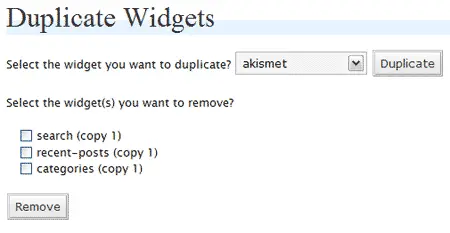
How to Install and Use Duplicate Sidebar Widgets (Historical Fix)
- Download Duplicate Sidebar Widgets and extract the PHP file to your wp-content/plugins/ directory.
- Login to your WordPress admin panel, navigate to the Plugins section, and activate Duplicate Sidebar Widgets.
- Go to Appearance > Widgets in the admin panel and use the options to duplicate or copy widgets.
- Drag the copied widgets to the sidebar where you want them to appear and preview your site.
Modern Recommendation
For current WordPress installations, it’s recommended to use the updated JAW Duplicate Widgets plugin available on WordPress.org. This plugin is actively maintained, fully compatible with modern WordPress versions, and provides the same duplicate-widget functionality safely and efficiently.