
Looking for a Dodge window sticker by VIN? Use the free lookup tool below to check whether a factory Monroney label is available for your vehicle. When a record is available, the sticker can show original MSRP, trim, factory options, engine details, fuel economy, and safety information. Results depend on the vehicle and the manufacturer's available records; no login or registration is required. If your VIN returns no result, see our VIN lookup troubleshooting guide.
Free Dodge Window Sticker by VIN Lookup Tool
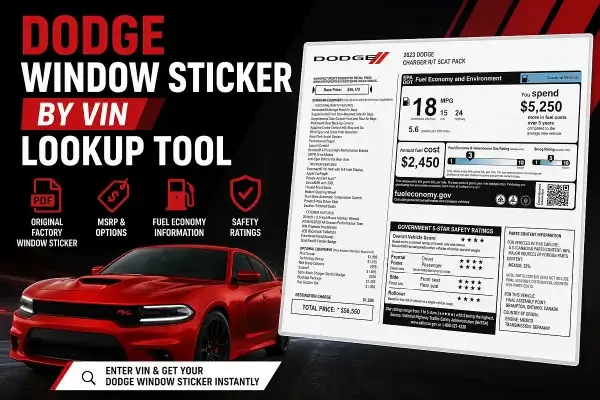
- Locate your 17-character Dodge VIN
- Enter it into the lookup tool below
- View or download the official factory PDF
Need your original factory sticker? Enter your VIN below to instantly access the official Dodge factory record.
This lookup tool supports many Dodge vehicles produced from 2012 to present, depending on manufacturer database availability. If you'd rather retrieve the PDF manually, jump to the direct URL method below.
What's on a Dodge Window Sticker?
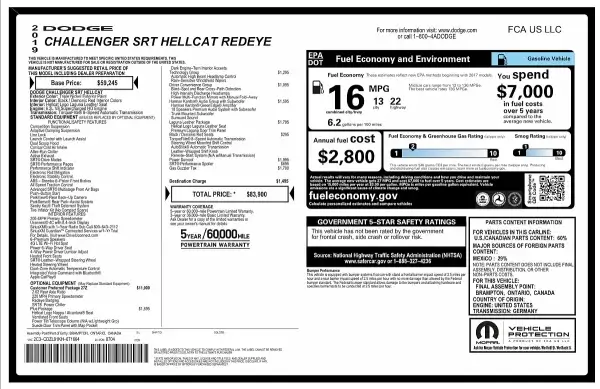
A Dodge window sticker, also known as a Monroney label, shows exactly how the vehicle was configured when it left the factory - which makes it one of the most reliable ways to verify a used Dodge's original build before you buy, insure, or resell it.
It typically includes:
- Original MSRP and total package pricing
- Trim level and factory-installed options
- Optional equipment packages and upgrades
- Engine, transmission, and drivetrain details
- EPA fuel economy ratings
- Factory standard equipment and safety features
- VIN-specific production information
Direct Dodge VIN to Window Sticker URL
You can also manually retrieve the original Dodge Monroney label by appending your VIN to the official lookup URL below:
https://www.dodge.com/hostd/windowsticker/getWindowStickerPdf.do?vin=VIN
Replace VIN with your full 17-character VIN (no spaces). This manufacturer URL may return a PDF when a matching record is available, but the endpoint or record availability can change. If it fails, try the lookup tool above or check the VIN for errors.
Supported Dodge Vehicles
Supported model years: Most 2012 and newer Dodge vehicles.
- Dodge Challenger
- Dodge Charger
- Dodge Durango
- Dodge Hornet
- Dodge Journey
- Dodge Grand Caravan
Where to Find Your Dodge VIN
- Driver side dashboard near the windshield
- Driver side door jamb sticker
- Vehicle registration or title
- Insurance documents
Dodge Window Sticker vs Dodge Build Sheet
The window sticker displays MSRP, options, fuel economy, and dealership information originally shown when the vehicle was sold new. A build sheet contains deeper factory production data, including package codes, manufacturing information, and internal configuration details. For more detailed factory decoding information, see the Dodge VIN decoder and build sheet lookup tools.
Troubleshooting
My VIN doesn't return a result
Double-check the VIN for typos, particularly zeros misread as the letter O. If the VIN is correct, the vehicle may still be in production, or the sticker may not yet have been published to the manufacturer database.
The vehicle is older or discontinued
Some pre-2012 Dodge vehicles don't have digital factory records available. If your VIN falls outside the supported range, a build sheet lookup may be a better option.
The direct URL returns an error
Manufacturer endpoints change periodically. Use the lookup tool at the top of this page, which stays updated automatically.
Dodge Window Sticker FAQ
What is a Dodge window sticker?
It's the factory Monroney label issued at the time of sale, showing the vehicle's original MSRP, trim, options, and EPA ratings exactly as built.
Does this work for older Dodge vehicles?
Most Dodge vehicles from 2012 onward are supported, depending on manufacturer database availability. Older vehicles may not have digital records available.
Why isn't my VIN returning a window sticker?
This is usually a typo in the VIN, a vehicle still in production, or a model that falls outside the manufacturer's available digital records.
More Window Sticker Lookup By VIN Tools
- Ford Window Sticker by VIN lookup
- Jeep Window Sticker by VIN lookup
- RAM Window Sticker by VIN lookup
- Chrysler Window Sticker by VIN lookup