
How to Convert YouTube Shorts into Normal Videos (Mobile, PC & WordPress): Turning YouTube Shorts into regular videos is surprisingly easy. Shorts have a different URL, which sometimes makes them harder to share or embed like normal YouTube videos. But there's a quick way around this-a simple URL change does the trick.
Here's how you can do it. I'll walk you through the steps for mobile, PC, and even show you how to automate the process if you're using WordPress.
Quick Answer
To convert a YouTube Short into a normal video, replace /shorts/ in the URL with /watch?v=. The video will then open using the standard YouTube player with full playback controls, comments, descriptions, and sharing options.
How to Convert YouTube Shorts into Normal Videos
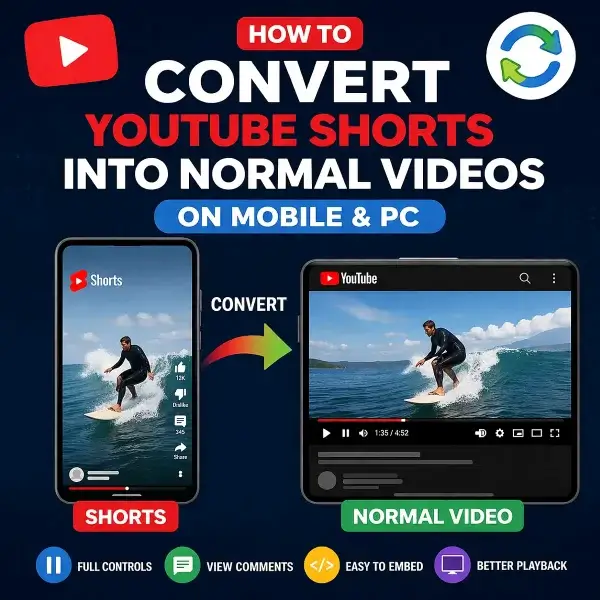
[ ▶︎ ] Convert YouTube Shorts into Normal Videos
What Is the Difference Between YouTube Shorts and Normal Videos?
YouTube Shorts use a different URL structure and player interface than standard YouTube videos.
YouTube Shorts format:
https://www.youtube.com/shorts/VIDEO_ID
Standard YouTube video format:
https://www.youtube.com/watch?v=VIDEO_ID
Converting the URL changes how YouTube displays the video, allowing access to the standard player interface with full playback controls, comments, descriptions, playlists, timestamps, theater mode, and easier embedding support.
Method 1: Convert a YouTube Shorts URL Manually
Simple Instructions (Mobile & PC)
- Open the YouTube Short
- Copy the video URL
- Replace
/shorts/with/watch?v= - Open the modified URL in your browser
Example:
https://www.youtube.com/shorts/abc123XYZ
↓
https://www.youtube.com/watch?v=abc123XYZ
The video will now open as a regular YouTube video using the standard player interface.
Method 2: YouTube Shorts Video Converter Tool
Paste your YouTube Shorts URL below to instantly convert it into a standard YouTube video link.
Automatically Convert YouTube Shorts URLs in WordPress
If you run a WordPress website, you can automatically convert YouTube Shorts links into standard video URLs so embeds display correctly and use the regular YouTube player.
Method 1: Automatically Convert Shorts URLs
Add the following code to your theme's functions.php file or a custom functionality plugin:
function auto_convert_shorts_urls($content) {
    return preg_replace_callback(
        '#https?://(www\.)?youtube\.com/shorts/([a-zA-Z0-9_-]+)#',
        function ($matches) {
            return 'https://www.youtube.com/watch?v=' . $matches[2];
        },
        $content
    );
}
add_filter('the_content', 'auto_convert_shorts_urls');
This automatically converts YouTube Shorts links inside WordPress posts and pages into standard YouTube video URLs.
Method 2: Fix Embedded Shorts Videos
If embedded Shorts videos are not displaying correctly, use this additional filter:
function fix_youtube_shorts_embeds($content) {
    return preg_replace(
        '#youtube\.com/shorts/#',
        'youtube.com/watch?v=',
        $content
    );
}
add_filter('the_content', 'fix_youtube_shorts_embeds', 20);
This helps prevent WordPress from loading Shorts using the vertical Shorts player layout.
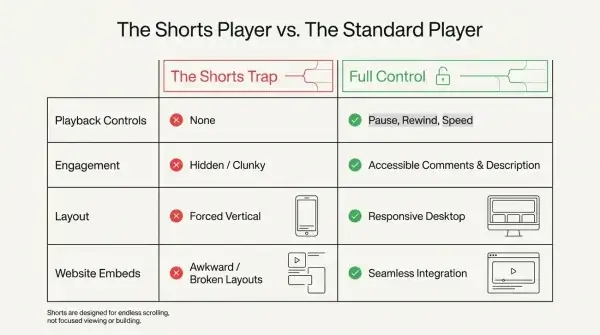
Why Convert YouTube Shorts into Normal Videos?
- Access full playback controls
- View comments and video descriptions
- Use timestamps and theater mode
- Improve embedding compatibility on websites
- Get a better viewing experience on desktop devices
- Easier sharing and playlist management
Does This Work on All Devices?
Yes. This method works on virtually all modern devices and browsers, including:
- iPhone and iPad
- Android phones and tablets
- Windows PCs
- Mac computers
- Chrome, Firefox, Edge, Safari, and other modern browsers
Final Thoughts
YouTube Shorts are designed for quick vertical viewing, but converting them into normal videos gives you access to the full YouTube player and additional playback features. Whether you are browsing on mobile, watching on desktop, or embedding videos in WordPress, this simple URL trick makes YouTube Shorts much easier to use.
If you found this guide useful, you may also want to learn how to share YouTube videos starting at a specific time.