
Get a RAM Window Sticker by VIN: Enter your 17-digit VIN below to look up your RAM's original factory window sticker, also known as the Monroney label. The available sticker can show the original MSRP, trim level, factory-installed options and packages, engine and drivetrain information, EPA fuel economy, and other vehicle details.
RAM Window Sticker by VIN Lookup Tool
This free RAM VIN window sticker lookup retrieves the available factory window sticker using your vehicle's 17-digit VIN. No login or registration is required. If you'd prefer to try the manufacturer's direct PDF method, jump to the direct URL method below.
Where to Find the VIN on a RAM
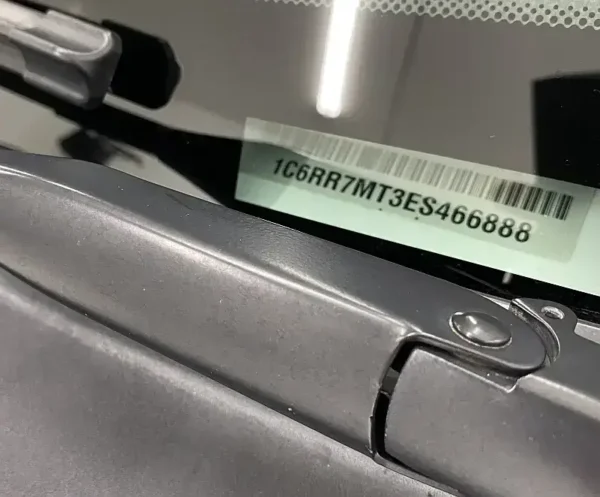
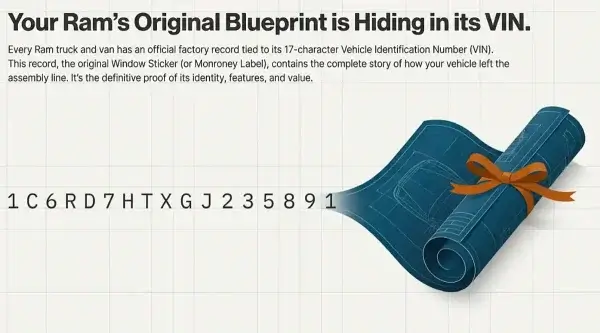
A RAM VIN (Vehicle Identification Number) is a unique 17-character identifier. You can usually find it in these locations:
- Driver's side dashboard, visible through the lower-left corner of the windshield
- Driver's side door jamb sticker
- Vehicle registration, title, or insurance documents
When entering your VIN, check carefully for common character mistakes. A zero can be mistaken for the letter O, and a 1 can be mistaken for the letter I. If the lookup does not return a result, verify all 17 characters and try again.
How to Get a RAM Window Sticker by VIN
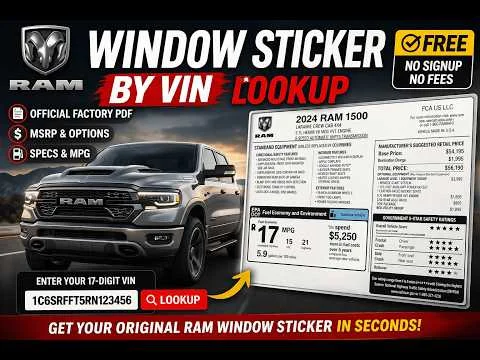
You can use the RAM window sticker lookup tool above to find the original factory window sticker associated with a RAM VIN.
- Locate your RAM's 17-digit VIN using one of the locations listed above.
- Enter the VIN into the RAM Window Sticker Lookup Tool at the top of this page.
- Submit the VIN and wait for the available vehicle information to load.
- View or download the available factory window sticker as a PDF.
The original window sticker can help you determine how the RAM was configured when it was built, including its trim level, factory-installed equipment, and original pricing information shown on the label.
What's on a RAM Window Sticker or Monroney Label?
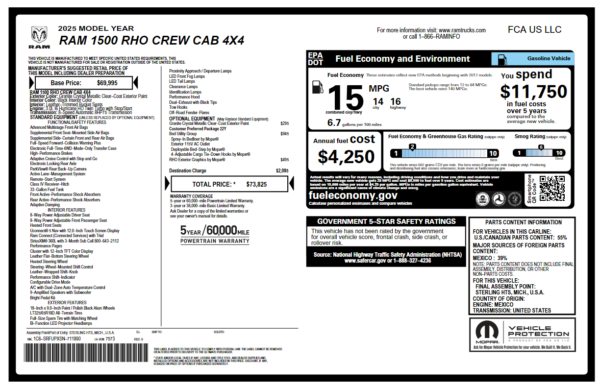
A RAM factory window sticker, also known as a Monroney label, documents the vehicle's original factory configuration and pricing information. Depending on the model and model year, it can include:
- Base MSRP for the vehicle's trim level
- Factory-installed options and packages with their associated pricing
- Engine, transmission, and drivetrain information
- EPA fuel economy information for the applicable powertrain
- Standard and available equipment associated with the vehicle
- Total vehicle price shown on the original label
The exact information displayed can vary by model year and vehicle.
RAM trucks can have substantial differences in factory equipment even when two trucks appear similar. A RAM 1500 Big Horn and a RAM 1500 Limited, for example, can have very different factory configurations. The original window sticker provides a useful record of the equipment and pricing associated with the vehicle when it was originally sold.
What Can I Use a RAM Window Sticker For?
A RAM factory window sticker can be useful when buying, selling, researching, or documenting a truck.
- Verify the original trim level and factory configuration
- Check factory-installed options and packages on a used RAM
- Confirm original MSRP and the pricing associated with factory equipment
- Document the truck's original configuration for your records
- Compare equipment between similar RAM trucks
- Distinguish factory-installed equipment from later modifications
The original window sticker represents the vehicle's recorded factory configuration. Dealer-installed accessories, later modifications, and equipment removed after production may not appear on the original sticker.
Direct RAM Window Sticker Lookup by VIN URL
You can also try retrieving the RAM window sticker PDF directly by appending your VIN to the manufacturer's window sticker endpoint:
https://www.ramtrucks.com/hostd/windowsticker/getWindowStickerPdf.do?vin=VIN
Replace VIN with the full 17-character VIN, without spaces.
This direct URL method depends on the manufacturer's current systems and database availability. If the endpoint stops working or does not return a sticker for your vehicle, use the RAM window sticker lookup tool at the top of this page instead.
RAM Window Sticker vs. Build Sheet
A RAM window sticker and a build sheet provide different types of vehicle information.
The window sticker is the customer-facing label that documents the vehicle's original configuration, equipment, and pricing information.
A build sheet provides deeper factory production information and may contain internal option codes, package information, and other manufacturing details that are not shown on the customer-facing window sticker.
For most buying, selling, and documentation purposes, the window sticker provides the information most people need. If you need deeper factory data, see the RAM build sheet and VIN decoder tools.
Supported RAM Models and Years
Many RAM vehicles from 2012 onward are supported, depending on vehicle and database availability. Common models include:
- RAM 1500
- RAM 2500
- RAM 3500
- RAM ProMaster
- RAM ProMaster City
Availability can vary by model, model year, and the underlying vehicle database. A very recent vehicle may not have a retrievable factory window sticker yet.
RAM Window Sticker Troubleshooting
No Result Returned
Check the VIN carefully before trying again. A single incorrect character can cause the lookup to return no result or fail to match the vehicle record. If the VIN is correct and the lookup still fails, see our guide to why a VIN lookup fails.
Pay particular attention to characters that are easy to confuse, such as zero and O.
The Vehicle Is Too New
If the RAM was recently manufactured, its factory window sticker may not yet be available in the underlying database. Try the lookup again later if the VIN is correct but no sticker is returned.
The PDF Won't Open
If the sticker is found but the PDF does not open correctly, try another browser or temporarily disable browser extensions that may interfere with PDF loading.
If the direct manufacturer URL fails, use the lookup tool at the top of this page instead.
Can I Get a Sticker for a Pre-2012 RAM?
The digital factory window sticker records used by this lookup are generally associated with RAM vehicles from 2012 onward. Older vehicles may not have a retrievable digital window sticker available through the current lookup system.
Other Stellantis Vehicle Window Stickers
RAM is one of several brands under the Stellantis umbrella. Similar factory window sticker lookup tools are available for other Stellantis brands.
If you have a Jeep, Dodge, or Chrysler VIN, you can use the corresponding lookup tool on this site:
RAM Window Sticker FAQ
Can I get a RAM window sticker by VIN?
Yes. Enter your RAM's 17-digit VIN into the free lookup tool at the top of this page. If a factory window sticker is available for the vehicle, the tool can retrieve the available sticker as a PDF.
What information does a RAM window sticker show?
A RAM factory window sticker can show the original MSRP, trim level, factory-installed options and packages, equipment, and other vehicle information. The exact information varies by model and model year.
Does the RAM window sticker lookup work for older trucks?
Many RAM vehicles from 2012 onward are supported, depending on vehicle and database availability. Older RAM vehicles may not have a retrievable digital factory window sticker.
Why does my RAM window sticker show options my truck doesn't have?
The original window sticker represents the vehicle's factory configuration. If the current truck differs from the sticker, equipment may have been added, removed, or changed after the vehicle was built.
What is the difference between a RAM window sticker and a build sheet?
A window sticker is the customer-facing label showing the vehicle's original configuration and pricing. A build sheet provides deeper factory production information and may contain internal codes and manufacturing details not shown on the window sticker.
Can I use the RAM window sticker tool for other Stellantis vehicles?
Separate lookup tools are available for other Stellantis brands, including Jeep and Chrysler. See the links above for those vehicles.
Other Window Sticker Lookups
- Ford Window Sticker by VIN
- Jeep Window Sticker by VIN
- Dodge Window Sticker by VIN
- Chrysler Window Sticker by VIN