
If your VIN lookup fails, you are not alone. Many car buyers, sellers, and owners encounter this frustrating issue when trying to access factory options, build sheets, or original window stickers. The good news is that a failed VIN lookup does not automatically mean something is wrong with the vehicle. Most often, it simply means you need a different approach or tool to get the information you need.
VIN lookups fail every day for perfectly legitimate vehicles. In many cases, the problem is not the VIN itself, but how and where that VIN is being searched. Understanding what is happening behind the scenes makes it much easier to get accurate vehicle data without guessing or wasting time.
Let's dive deeper into why this happens and how to solve it.
Why a VIN Lookup Fails - Now What?
This guide explains why your VIN lookup fails, what a "VIN not found" message really means, why your VIN decoder may not be working, and what to do when a window sticker is not available. I'll also provide tips, simple troubleshooting steps, and brand-specific guidance so you can access complete vehicle data reliably.
Many online tools oversimplify VIN lookups, which leads to confusion when expected data does not appear. This guide is designed to bridge that gap by explaining how VIN systems actually work and what your next best move should be when a lookup fails.

What a VIN Lookup Is Supposed to Do
A Vehicle Identification Number, or VIN, is a 17-character code that uniquely identifies a vehicle. Each character or group of characters represents specific information about how and where the vehicle was built.
When a VIN lookup works correctly, it can provide detailed information from a Monroney window sticker, build sheet, or VIN decoder such as:
- Year, make, model, and trim
- Engine and drivetrain details
- Factory installed options and packages
- Original MSRP and pricing
- Build plant and production data
What many people do not realize is that different lookup tools serve different purposes. Some tools simply decode the VIN format itself, while others attempt to pull stored factory records tied to that VIN.
Not all VIN lookup tools access the same databases. Some only decode the VIN structure, while others pull full records from manufacturer databases. Understanding this difference is key to avoiding lookup failures and knowing which tool to use for what purpose.
Why Your VIN Lookup Fails
Why would a VIN number not be found?
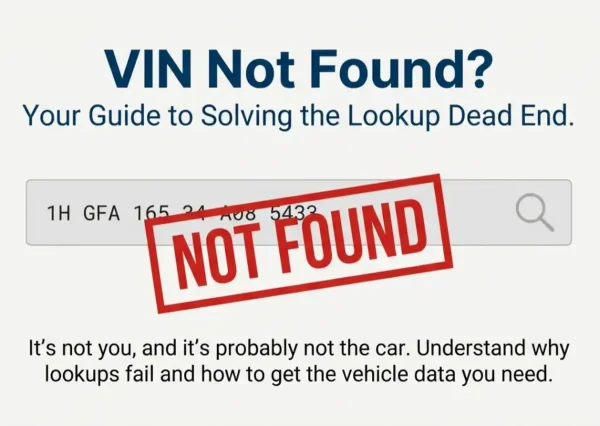
If you have ever seen a "VIN not found" message or noticed that a VIN decoder is not working, here are the most common reasons, along with real world examples and tips. In most cases, one of these explanations applies.
The vehicle is too old
Many manufacturer databases only retain detailed records for vehicles produced within a specific time frame. While the VIN itself remains valid forever, the supporting factory data may not.
Older vehicles may still decode at a basic level, but factory options and window sticker data may not be available. For example, a 1995 Ford Mustang may decode for make and model, but the original window sticker will likely be unavailable online because those records were never digitized or were later purged.
The vehicle was imported or sold outside the US
Gray market vehicles, Canadian imports, and international models may not appear in US manufacturer databases. Even though the VIN is valid, it may not be supported by certain lookup tools that rely exclusively on US records.
For instance, a Jeep imported from Canada might only show minimal details in a US VIN decoder, while Canadian databases may hold more complete information.
The vehicle was built for fleet or commercial use
Fleet vehicles are sometimes recorded differently in manufacturer systems. In some cases, window stickers were never generated for fleet or commercial vehicles in the same way they were for retail buyers.
A Dodge Ram used as a commercial pickup may lack a retrievable window sticker entirely, even though the VIN is legitimate and decodes correctly at a basic level.
Rebuilt or salvaged vehicles
Vehicles that have been rebuilt after major accidents can sometimes show VIN discrepancies between locations such as the dashboard, door jamb, or frame. These inconsistencies may cause lookup tools to reject the VIN or return partial data, even when the vehicle is legally registered.
The VIN decoder only reads structure, not factory data
If your VIN decoder is not working, it may be because the tool only interprets the VIN characters to identify make, model, and year. These tools do not pull factory options, packages, or pricing.
This is one of the most common reasons people believe a VIN lookup has failed, when in reality the tool simply was not designed to provide window sticker level detail.
Manufacturer database limitations
Even official manufacturer sources can have gaps. Older systems, database migrations, and discontinued platforms can all cause incomplete results.
VINs that are shorter than 17 characters, contain invalid characters, or belong to unsupported vehicle types such as ATVs or off road vehicles may fail lookup entirely, even if the VIN appears legitimate to the owner.
In practice, a 2001 Chevrolet may show in a VIN decoder but have missing option data due to older factory record systems that no longer exist or were never fully archived.
VIN Decoder vs Window Sticker Lookup
Understanding the difference between a VIN decoder and a window sticker lookup by VIN is critical, especially if you are trying to verify factory options or original pricing.
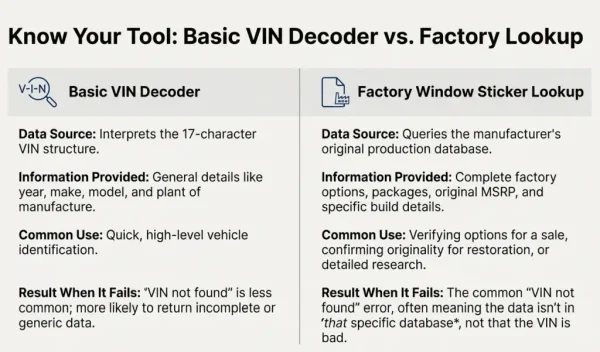
A VIN decoder tells you the vehicle's general information based on the structure of the VIN. It is useful for identification, registration, and basic verification, but it is limited in detail.
A window sticker lookup pulls the original factory build data, including options, packages, and pricing. When a window sticker is not available, it does not mean the VIN is invalid. It usually means the factory data is not accessible through that specific tool or source.
What to Do When Your VIN Lookup Fails
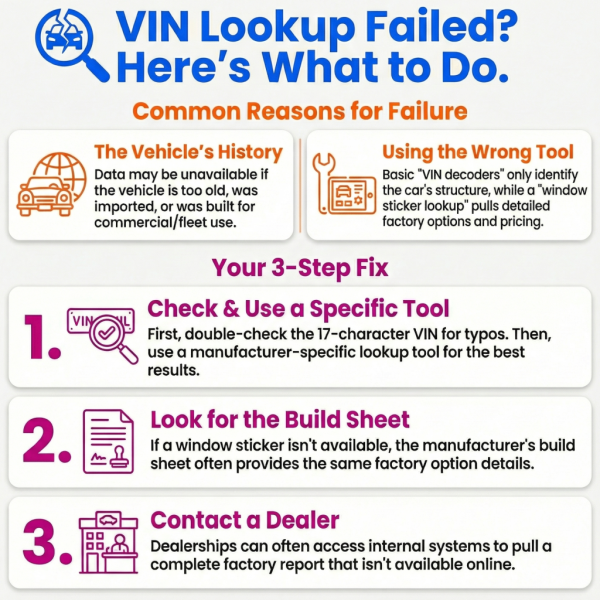
When a VIN lookup fails, follow these steps in order. Skipping steps often leads to unnecessary frustration.
- Check for typos: A single incorrect character in your VIN can cause a VIN not found error. Characters like O and 0, or I and 1, are common mistakes. In some cases, a VIN fails validation because the internal checksum digit (the 9th character) does not pass. This usually points to a data entry error rather than an invalid vehicle.
- Use a manufacturer specific lookup: Brand specific tools often provide better access to factory data than generic decoders.
- Look for a build sheet: Some manufacturers provide build sheets even when a window sticker is not available. Build sheets often list options without pricing.
- Verify options on the vehicle: Physical inspection of axle tags, engine labels, and interior features can help confirm factory equipment.
- Contact a dealer: Dealerships often have access to internal systems not available online and may be able to pull factory reports using the VIN.
- Try manual identification if available: Some lookup tools allow you to manually select the make, model, and year when a VIN fails. While not a replacement for factory data, this can help narrow down configurations when automated tools fall short.
Brand Specifics on VIN Lookup Failures
Ford - Ford window sticker data is generally reliable, but older models or fleet units may show gaps, especially pre-2008 vehicles.
Jeep - Jeep VIN lookups can fail for older models or during platform transitions. Build sheets are often available even when window stickers are not.
Ram - Early production Ram trucks or fleet builds may have incomplete data. Trim levels and cab configurations can be harder to verify.
GM and other brands - Data availability varies widely. Third party tools may only show partial VIN information depending on model year.
Tips for Successfully Retrieving Vehicle Data by VIN
- Try multiple lookup tools to cross reference information.
- Keep a list of manufacturer support pages for older or imported vehicles.
- Use VIN labels, engine codes, and trim details for manual verification.
- Search automotive forums for rare or problematic VINs.
- Create a small checklist for troubleshooting VIN lookup failure scenarios.
- Document findings so future lookups are faster and easier.
FAQ: Common VIN Not Found Problems
Why does my VIN lookup fail?
VIN lookups fail due to database limits, older vehicles, imported models, fleet and commercial configurations, or simple data entry errors.
What should I do if a VIN is not found?
Double check the VIN for errors, then try a manufacturer specific lookup or check for a build sheet.
How can I get a window sticker if it’s not available?
Look for a build sheet, contact the dealer, or try alternative online sources for that specific brand.
Why is my VIN decoder not working?
Many decoders only read VIN structure. Use a manufacturer focused lookup to access full factory data.
Final Thoughts
Understanding why a VIN lookup fails or why your VIN decoder is not working can save you frustration and time. Whether you are trying to retrieve factory options, build sheets, or original pricing, following the steps outlined above gives you the best chance of success.
Start with a manufacturer focused window sticker lookup, then expand to build sheets or dealer verification if needed. In most cases, the information is still available, you just need to know where to look.