
How to Extract Attachments from Email Messages – In this tutorial, I show how to easily extract attachments from email messages stored in formats such as .eml, .pst, and .msg. This can be useful if you want to quickly save attachments from many emails at once instead of opening each message individually.
One simple way to accomplish this task is by using a free email attachment extractor called UUDWIN, created by Mark Spankus. This lightweight utility can batch extract attachments from multiple email files and save them to a folder of your choice.
How to Extract Attachments from Email
- Download UUDWIN, extract the archive, and run the program.
- Locate your email storage folder where the message files are stored.
- For example, Windows Live Mail typically stores messages in:
%UserProfile%\AppData\Local\Microsoft\Windows Live Mail
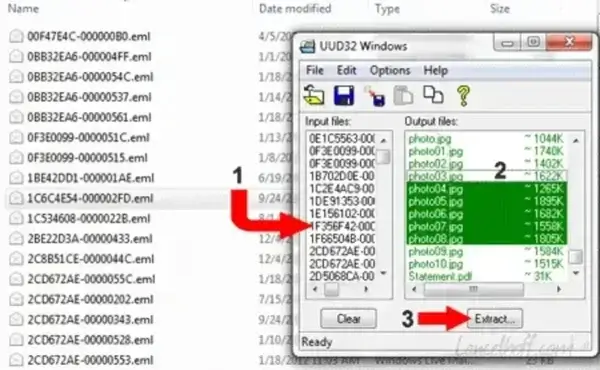
- Drag and drop your .eml, .pst, or .msg files into the UUDWIN input window.
- Select the attachments you want to extract from the output window.
- Click Extract and choose a folder where the attachments should be saved.
Alternative Methods
While UUDWIN works well for older email archives, modern email clients also offer built-in ways to save attachments:
- Microsoft Outlook: Open the email and choose Save All Attachments.
- Thunderbird: Right click the attachment and select Save All.
- Windows Mail: Use the attachment menu to download files from messages.
However, these built-in options typically require opening each message individually. Tools like UUDWIN allow you to process many email messages at once and quickly extract all attachments in bulk.
When This Method Is Useful
- Extracting attachments from archived email files
- Recovering files from exported Outlook or Windows Mail mailboxes
- Saving attachments from hundreds of stored messages
- Organizing attachments from old email backups
Final Thoughts
Batch extracting attachments can save a significant amount of time when working with large email archives. By using a simple tool like UUDWIN, you can quickly scan message files and extract the attachments you need without manually opening each email.
Related searches: extract attachments from outlook pst, save attachments from eml files, batch extract email attachments, outlook attachment extractor