
How to install Windows XP on a DV9000 Laptop
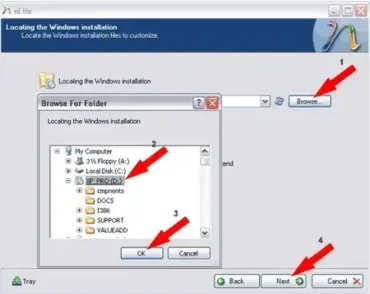
How to Install Windows XP on an HP DV9000 Laptop – In this tutorial, we walk through the process of installing Windows XP Professional on an HP DV9000 series laptop with an Intel processor. Because Windows XP does not include native SATA AHCI drivers for many newer systems, we will use the nLite tool to create a custom Windows XP installation disc with the required SATA drivers integrated.
You should also have a USB flash drive available to store important chipset and network drivers. These drivers will allow you to connect to the internet after Windows XP is installed so you can download the rest of the system drivers.
This tutorial was originally tested on an HP DV9030US notebook.